I Didn't Replace the Spreadsheet. I Built Around It
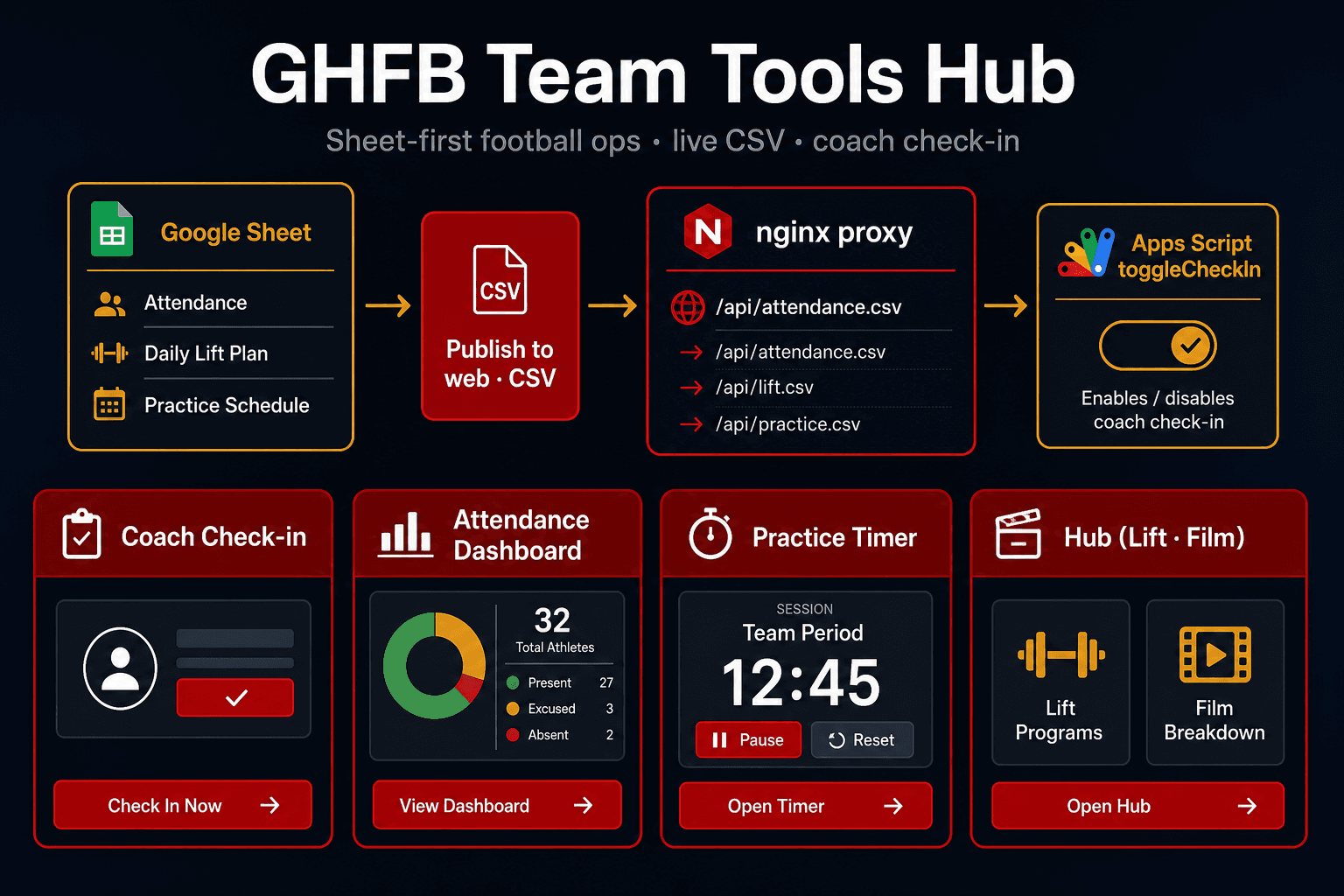
When I started building tools for the Godwin Heights football program, the attendance workbook already existed. Coaches were marking X in cells, tracking conditioning in C columns, and using a Google Form as backup. The data model was sound. The UX on a phone was not.
The instinct with new software is to migrate everything into a database and ship a custom admin panel. That almost always fails with volunteer coaching staff mid-season. They don't want a new system. They want the spreadsheet — just faster, clearer, and reachable from the weight room floor.
GHFB (Godwin Heights Football Team Tools Hub) is what I built instead: a static PWA that treats the Google Sheet as the database and published CSV as the read API.
The Problem I'm Solving
Coaches were comfortable with a specific workflow:
- A Google Sheet with roster names in columns A–B and session dates across the top
- An
Xmark when a player showed up - A
Ccolumn after each date for conditioning - A Google Form some staff still preferred for summer attendance backup
What they were not comfortable with:
- Logging into a new app with separate credentials
- Re-entering 53 names somewhere else
- Losing the formulas they already trusted for ironman thresholds
- Waiting for me to "add today" in code every morning
The goal wasn't better data modeling. It was better interfaces on the same model.
Design Principle: Sheet-First, Not Sheet-Replacement
Three rules drove every decision:
- If a coach can do it in the sheet, the app should write to the same cell.
- If the dashboard can read it from a published CSV, don't build an API.
- If the sheet structure changes, verify scripts — not emergency deploys — catch the drift.
That meant accepting tradeoffs: reads are eventually consistent; business logic lives in both JavaScript and Apps Script; school Google accounts can't always deploy web apps so a personal-account deploy writes to a shared school sheet.
Those tradeoffs are cheaper than a tool nobody uses.
The Live CSV Pattern
Google Sheets has a feature coaches already know: File → Share → Publish to web → CSV. Each tab gets a public CSV URL.
The browser can't fetch that URL cleanly — CORS blocks it, and you don't want every coach device hitting Google directly anyway. So GHFB proxies it:
Browser → /api/attendance.csv → nginx (90s cache) → docs.google.com/spreadsheet/pub?output=csv
Same pattern for three tabs:
| Sheet tab | Proxy route | Used by |
|---|---|---|
2026 Summer WR & Conditioning | /api/attendance.csv | Check-in roster, dashboard, hub today strip |
Daily Lift Plan | /api/lift-plan.csv | Hub banner, GH Lift deep links |
Practice Schedule | /api/practice-schedule.csv | Practice timer, hub now/next |
Each tab is effectively a micro-API with zero backend code — just publish, proxy, parse.
Parsing CSV for real
Published Google CSV isn't always trivial. Quoted fields can contain commas and newlines. GHFB uses a small RFC-style parser:
export function parseCSV(text) {
  const rows = [];
  let row = [];
  let value = "";
  let inQuotes = false;

  for (let i = 0; i < text.length; i++) {
    const ch = text[i];
    const next = text[i + 1];

    if (ch === '"') {
      if (inQuotes && next === '"') {
        value += '"';
        i++;
      } else {
        inQuotes = !inQuotes;
      }
    } else if (ch === "," && !inQuotes) {
      row.push(value.trim());
      value = "";
    } else if ((ch === "\n" || ch === "\r") && !inQuotes) {
      if (ch === "\r" && next === "\n") i++;
      row.push(value.trim());
      rows.push(row);
      row = [];
      value = "";
    } else {
      value += ch;
    }
  }
  // ...
  return rows;
}
Caching layers
Live CSV doesn't mean hammer Google on every tap:
- nginx: ~90 second proxy cache (
X-GHFB-Cache: HIT/MISS) - Browser:
sessionStorageTTL — 3 minutes for attendance, 5 for lift/practice plans - Check-in API state: 45 seconds for merge reads
Dashboards may lag a check-in by a minute or two. That's acceptable when coaches see immediate confirmation in the tap-list and the sheet itself updates on write.
Building Around the Form Coaches Already Used
The hub still links the Summer Attendance Form. Some coaches prefer form entry. I didn't remove it — the sheet stays canonical, and check-in is the faster path for daily weightroom sessions.
The sheet conventions match what staff already did manually:
| Convention | Meaning |
|---|---|
Date header 6/19 | Weightroom session that day |
C in the next column | Conditioning for that date |
P 6/9 header | Football practice (separate from ironman math) |
X in a cell | Player attended that session |
When today's column is missing, the check-in UI doesn't show a generic error. It says: add column labeled 6/19 with C immediately to the right. That's spreadsheet language, not developer language.
Hybrid Read/Write: Why Not CSV for Everything?
Published CSV is read-only. Coaches need to write X marks from a phone. That's Google Apps Script:
check-in.html → /api/checkin → Python proxy → Apps Script doPost → same cell in school sheet
Check-in uses a deliberate split:
- Load roster from CSV — Grid appears instantly; no waiting on Apps Script cold starts
- Merge marks from API — Reconcile what the coach tapped with what's already in the sheet
- Queue writes — Optimistic UI; FIFO save queue; grid stays tappable on bad gym Wi‑Fi
export async function fetchCsvRows() {
  const cached = readCsvCache();
  if (cached) return parseCSV(cached);
  const text = await fetchCsvText();
  writeCsvCache(text);
  return parseCSV(text);
}
CSV for speed. Apps Script for truth on writes. Both point at the same workbook.
The school-account workaround
The school Google domain often can't deploy Apps Script web apps. The fix documented in the repo:
- Share the school sheet with a personal Gmail as Editor
- Deploy the script from the personal account
- Proxy
/api/checkinthrough a small Python sidecar in the Docker container (followsscript.googleusercontent.comredirects, fixes CORS)
It's not elegant infrastructure. It's pragmatic infrastructure that ships.
Shared Logic in Two Places
Rolling attendance %, ironman thresholds, momentum, and "needs attention" lists must match the workbook formulas. That logic lives in:
shared/ghfb-attendance.js(dashboard + hub)scripts/coach-check-in/Code.gs(check-in writes + API reads)
The docs explicitly say to keep them aligned. Verify scripts catch structural drift:
node tools/verify-attendance-practice.mjs
node tools/verify-practice-schedule.mjs
If you go sheet-first, treat the sheet schema like a contract and test against it.
What the Coaches Actually Get
From the same three tabs, the hub exposes:
- Coach check-in — Tap-list for weightroom, conditioning, and practice
- Attendance dashboard — Rolling %, ironmen, momentum, charts, at-risk lists
- Practice timer — 5-minute grid with live countdown and coach PIN edits
- Today strip — Lift plan, practice now/next, attendance column status on the hub home screen
- PWA install — Add to home screen; GH Lift and Film Review load in-app at
/lift/and/film/
No npm dependencies on the front end. Vanilla ES modules. nginx + Docker on a VPS. GitHub Actions deploy on push to main.
Lessons Learned
Adoption beats architecture. The spreadsheet was never the enemy — scrolling 53 names on a phone was.
Publish to web is underrated. For read-heavy, coach-maintained data, live CSV through a same-origin proxy is often enough API.
Meet coaches in their vocabulary. Date columns, C markers, X attendance, ironman % — build UIs that speak that language and fail with actionable sheet instructions.
Eventual consistency is fine when writes are immediate and reads are analytics. Coaches trust the tap-list because the sheet updates; the dashboard can refresh a minute later.
Document the sheet model. The repo's docs/sheet-model.md and Mermaid architecture diagrams matter as much as the JavaScript — the next maintainer (or next season's you) needs the contract, not just the code.
What's Next
GHFB sits alongside GH Lift and the GH Film Review Pipeline as part of the same program toolchain — JSON-driven lift posters, CSV-driven film analytics, and sheet-driven attendance ops, all reachable from one installed hub.
The pattern generalizes: if your users already maintain a spreadsheet well, your first move probably isn't a database. It's a better window into the sheet they already open every day.
Human Reflections
The moment this clicked was watching a coach add a new date column before practice, mark a few Xs by hand, and ask why the check-in app "already knew" the roster. It read the same published CSV they had just edited. No deploy. No ticket to me. That was the whole point.
The hardest part wasn't JavaScript. It was resisting the urge to "properly" rebuild attendance in Postgres. The sheet was already the source of truth; the staff already trusted it. My job was to make the phone experience match the floor experience.
More about this project here.
Low to No Cost Solutions Series
Part 3 of 6