Introduction
SEOS (Software Engineering OS) is an AI-native operating system for software repositories. Instead of treating an AI assistant as a chatbot that writes code, SEOS treats the repo itself as the coordination layer — composing specialist agents from shared rules, driving them through GitHub label state machines, and closing the loop with deploy health checks and accumulated lessons.
The first production deployment lives on Fasted (PR #93). The open-source template, CLI, and workflow recipes are maintained in the SEOS repository.
For the narrative — why I built this, what changed from v1, and lessons learned — read the companion blog post: From One Agent to an OS.
Status: Active — Running on real issues in production. Tier 1 scaffolding ships from the SEOS repo; the full specialist-agent stack is documented as recipes with Fasted as the reference implementation.
Problem & Solution
The Problem
A single coding agent pipeline solves implementation latency but hits a ceiling quickly:
- Prompt sprawl — every new agent role means another monolithic
ai-*-context.mdfile with duplicated stack info - No specialists — planning, architecture review, test advisory, docs, and deploy stay human-only afterthoughts
- Manual label gates — clicking
needs-specandreadyon every issue becomes a bottleneck - No learning loop — production failures don't feed back into agent context automatically
- Context drift — editing one prompt file without updating the others produces inconsistent agent behavior
The Solution
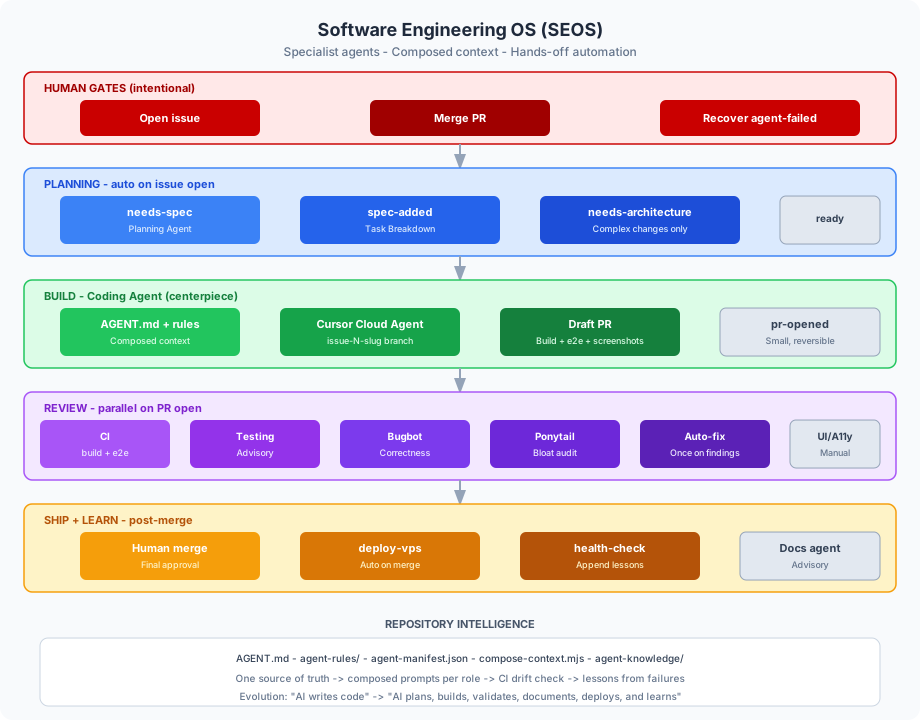
SEOS addresses these with five architectural layers:
- Repository intelligence — one canonical rule set, composed per role via manifest
- Specialist agents — planning, architecture, coding, testing, docs, deploy, and fix as first-class workflow roles
- Automation graph — label-triggered GitHub Actions with intentional human gates
- Local CLI — invoke any agent role from the terminal with identical context to CI
- Knowledge loop — health-check failures append structured lessons for future runs
Architecture Overview
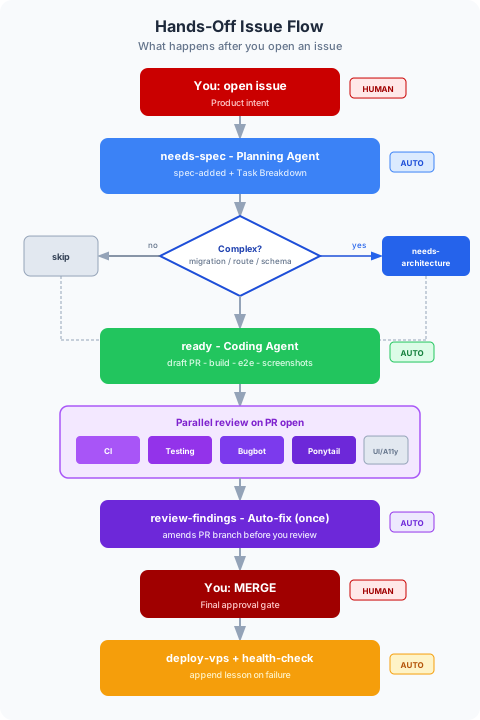
The default hands-off flow:
Repository Intelligence Layer
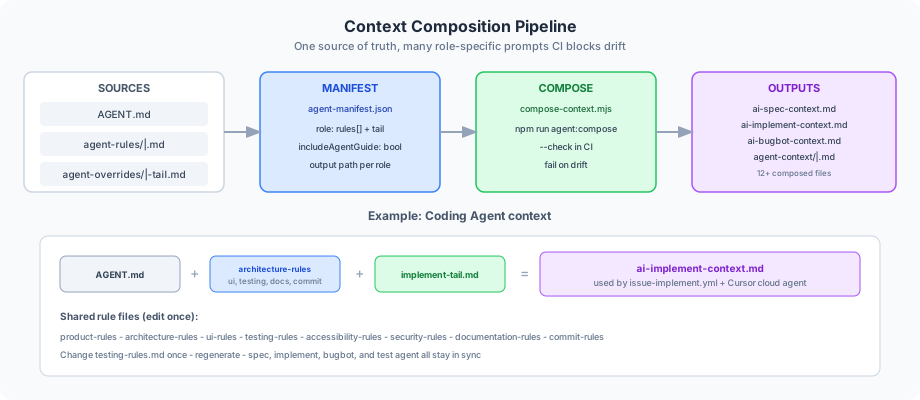
The core innovation is composed context — one source of truth, many role-specific views.
| Asset | Purpose |
|---|---|
.github/AGENT.md | Canonical entry point read by all agents |
.github/agent-rules/ | Focused rule files: product, architecture, UI, testing, a11y, security, docs, commits |
.github/agent-manifest.json | Declares which rules + tail overrides each role needs |
scripts/lib/compose-context.mjs | Assembles final prompts; --check mode for CI drift detection |
.github/agent-overrides/*-tail.md | Role-specific completion checklists and constraints |
Regenerated ai-*-context.md | Backward-compatible output paths for existing workflows |
Example manifest entry for the coding agent:
".github/ai-implement-context.md": {
  "title": "# App — Implementation Agent Context",
  "includeAgentGuide": true,
  "rules": ["architecture-rules", "ui-rules", "testing-rules", "documentation-rules", "commit-rules"],
  "tail": "implement-tail.md"
}
Change testing-rules.md once, run npm run agent:compose, and every role that includes testing rules stays in sync. CI fails the PR if composed files are stale.
Specialist Agent Roster
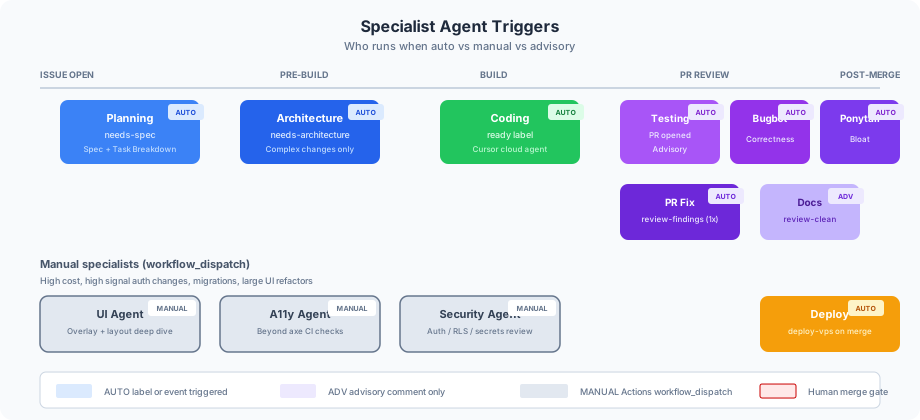
| Agent | Trigger | Mode | Role |
|---|---|---|---|
| Planning | needs-spec (auto on issue open) | Auto | Spec + Task Breakdown |
| Architecture | needs-architecture | Auto | Pre-impl review for migrations, routes, schema |
| Coding | ready | Auto | Implementation via Cursor cloud agent |
| Testing | PR opened | Auto | Advisory test-coverage comment |
| Bugbot | PR opened | Auto | Correctness review |
| Ponytail | PR opened | Auto | Bloat / over-engineering audit |
| PR Fix | review-findings (once) | Auto | Amends PR branch |
| Documentation | review-clean | Advisory | Docs checklist comment |
| UI / A11y / Security | workflow_dispatch | Manual | Deep dives on high-risk PRs |
| Deploy | merge to main | Auto | VPS deploy + health-check |
Manual specialists (UI, A11y, Security) are intentionally excluded from the automatic loop — each run is a full Cursor cloud agent invocation, and CI already covers axe a11y, e2e, and security scanning. Trigger them for auth changes, migrations, and large UI refactors.
Label State Machine
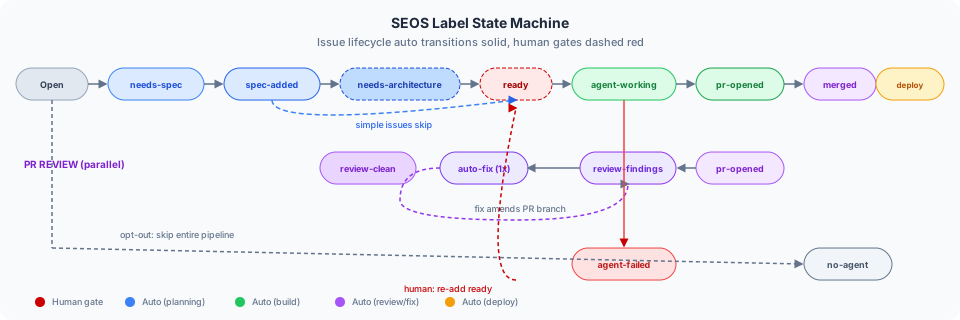
Key labels:
| Label | Meaning |
|---|---|
needs-spec | Triggers planning agent |
spec-added | Spec posted; auto-ready eligible |
needs-architecture | Complex change — architecture review before ready |
ready | Triggers coding agent |
agent-working | Cloud agent dispatched |
pr-opened | Draft PR created |
review-findings | Bugbot/Ponytail found issues — triggers one auto-fix pass |
review-clean | Review passed — triggers docs advisory |
agent-failed | Agent blocked or errored — human recovery |
no-agent | Opt out of entire pipeline |
Opt-out markers: [no-agent] in issue title, agent-manual label (auto spec only), or AGENT_AUTO_*_ENABLED=false repo variables.
GitHub Actions Workflows
| Workflow | Trigger | Agent role |
|---|---|---|
issue-auto-triage.yml | Issue opened | Auto-add needs-spec |
issue-spec.yml | needs-spec label | Planning agent (OpenAI) |
issue-architecture.yml | needs-architecture label | Architecture agent |
issue-auto-ready.yml | spec-added label | Auto-add ready (simple issues) |
issue-implement.yml | ready label | Coding agent (Cursor SDK) |
issue-auto-fix.yml | review-findings label | PR fix agent (once) |
pr-test-agent.yml | PR opened | Testing advisory |
pr-specialist-review.yml | Manual dispatch | UI / A11y / Security |
issue-docs.yml | review-clean label | Documentation advisory |
ci.yml | PR / push | Build, e2e, a11y, artifact checks |
visual.yml | Nightly cron | Visual regression snapshots |
deploy-vps.yml | Merge to main | Production deploy |
health-check.yml | Post-deploy | Probe + append agent lesson on failure |
Dispatch scripts use @cursor/sdk for cloud agent invocation and read composed context files plus the full issue thread (title, body, comments).
Local CLI
The same manifest and compose pipeline powers local agent invocation:
npm run agent:compose          # Regenerate all ai-*-context.md files
npm run agent:compose -- --check  # CI drift check
npm run agent:issue -- 88      # Compose context for issue #88
npm run agent:review -- 42     # Review agent against PR #42
npm run agent:fix -- 42 "fix findings"
npm run agent:test             # Testing agent locally
npm run agent:docs -- 88       # Documentation checklist
npm run agent:deploy           # Deploy context
Local and cloud agents read identical composed context — no "works on my machine" for prompts.
Knowledge Loop
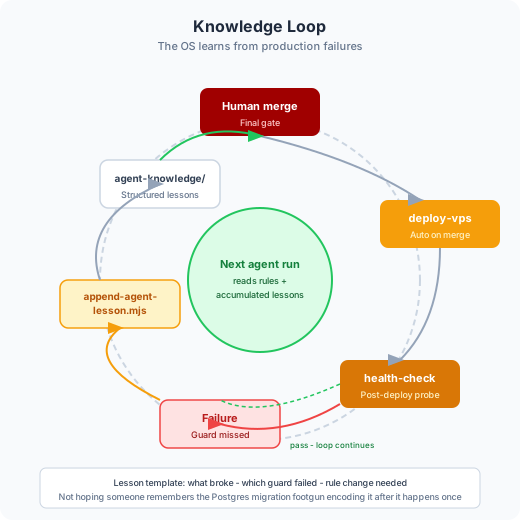
.github/agent-knowledge/ stores structured lesson templates. When health-check.yml fails post-deploy, append-agent-lesson.mjs records what broke, which guard missed it, and what rule should change. Future agent runs read accumulated lessons alongside the composed rules.
Quality Feedback Loop
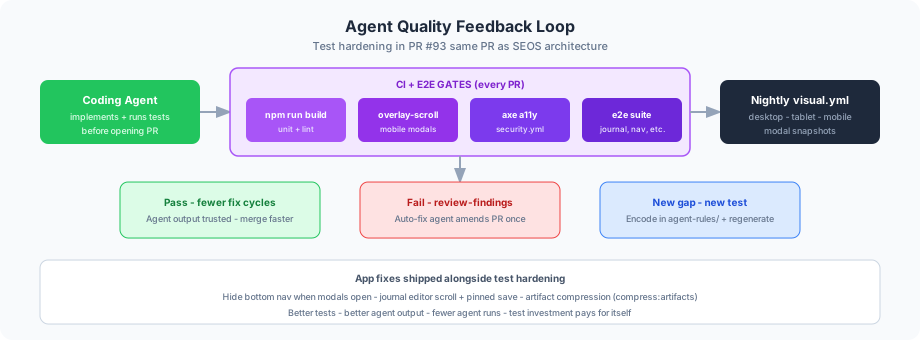
SEOS ships alongside test hardening — agents are only as good as their feedback loop:
- overlay-scroll e2e — mobile modal/nav scroll regressions
- Visual regression — nightly snapshots at desktop, tablet, mobile
- axe a11y + security.yml — automated accessibility and security gates
- Artifact compression — CI check keeps screenshot artifacts from bloating the repo
SEOS Repo Layout
The SEOS repository provides the consumer-facing template and tooling:
| Path | Purpose |
|---|---|
template/ | Drop-in template: workflows, context files, scripts |
packages/dispatch/ | @issue-bench/dispatch — Cursor SDK dispatch script |
packages/cli/ | npx issue-bench init with stack presets |
workflows/ | Canonical workflow YAML |
context/ | Base context templates and stack presets |
docs/ | Setup, label state machine, Tier 2 recipes |
Quick start
npx issue-bench init --preset vite-react --yes --name "My App" --repo owner/repo
npm install
Add OPENAI_API_KEY and CURSOR_API_KEY to GitHub Actions secrets. Tier 2 recipes (CI gates, Bugbot/Ponytail, deploy health, SEOS specialist agents) are in docs/recipes/ with Fasted as the reference implementation.
v1 vs SEOS
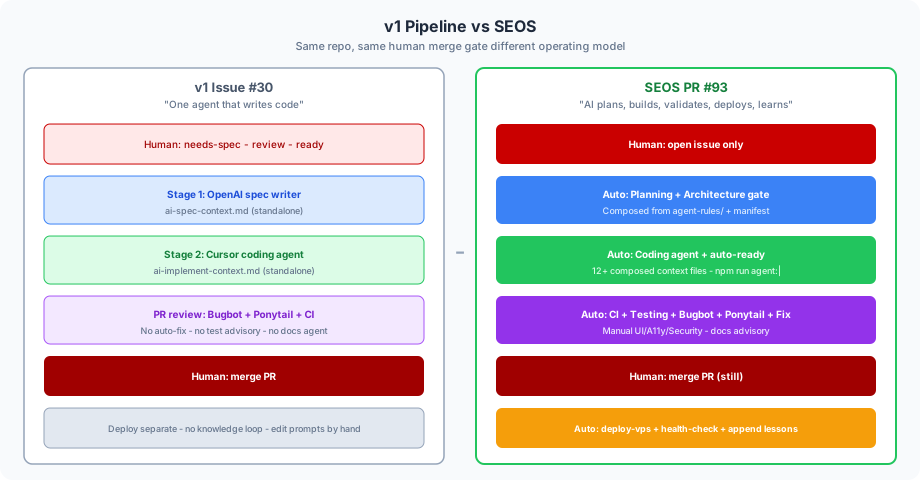
| Capability | issue-bench (v1) | SEOS |
|---|---|---|
| Agents | 1 coding agent | 8+ specialist roles |
| Context | Standalone prompt files | Composed from manifest + rules |
| Label gates | Manual needs-spec + ready | Auto spec, auto ready, architecture gate |
| Review | Bugbot + Ponytail | + testing advisory, auto-fix, docs |
| Deploy | Separate | Auto deploy + health-check + lessons |
| Local dev | Edit markdown by hand | npm run agent:* CLI |
Secrets & Configuration
| Secret / Config | Used by |
|---|---|
OPENAI_API_KEY | Planning, architecture, testing, docs agents |
CURSOR_API_KEY | Coding, fix, manual specialist agents |
.github/issue-bench.yml | Model selection, label config, auto-triage rules |
AGENT_AUTO_SPEC_ENABLED | Toggle auto needs-spec on issue open |
AGENT_AUTO_READY_ENABLED | Toggle auto ready after spec |
AGENT_AUTO_FIX_ENABLED | Toggle auto-fix on review-findings |
Target Users
- Solo developers shipping with AI agents who need structure, not chat history
- Small teams wanting GitHub-native agent orchestration without a custom dashboard
- Engineering managers curating agent rules as living repo documentation
- DevOps engineers wiring deploy health checks into agent feedback loops
Conclusion
SEOS is the opinion that AI-assisted development scales when you build the operating system, not just the coding agent. Repository rules, composed prompts, label state machines, specialist workflows, and a knowledge loop turn "I asked Cursor to fix something" into "I opened an issue and the bench ran itself."
The SEOS repo ships the template and CLI. Fasted is the live reference. The blog post is the story of how we got here.