Introduction Section
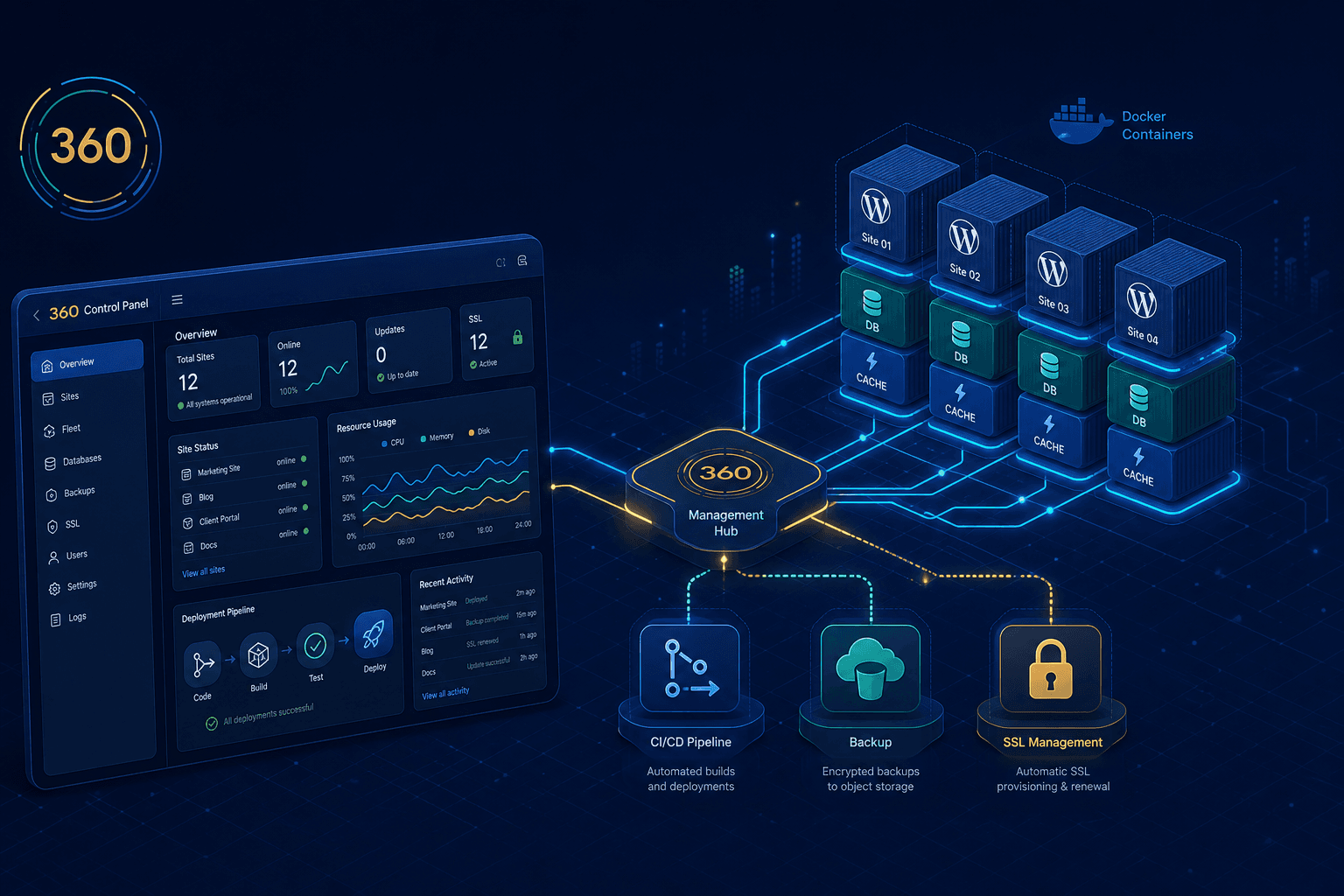
360 Web Solutions Cloud is a self-hosted platform for running and managing a fleet of WordPress sites from a single control plane. Instead of paying per-site fees on managed WordPress hosting, each client site runs as its own isolated Docker stack on a single VPS — WordPress, MySQL, Redis, and phpMyAdmin — while a FastAPI backend and React dashboard provide centralized discovery, updates, backups, and monitoring across every site.
Status: In Active Development — The WordPress hosting and management system is functional end-to-end: sites are provisioned from a template, deployed automatically through GitHub Actions, managed through the dashboard and a MainWP hub, and backed up off-site to Backblaze B2. Work continues on deployment hardening, richer dashboard analytics, and broader automation.
Problem & Solution
The Problem
Running multiple WordPress sites — for clients, side projects, or a small agency — creates recurring pain:
- Per-site hosting costs — Managed WordPress hosting charges per site, and the bill scales linearly with every new client
- Scattered management — Updating core, plugins, and themes across many sites means logging into each
wp-adminindividually - Inconsistent setups — Hand-built sites drift apart in configuration, making them hard to support
- Backup uncertainty — Off-site, restorable backups are easy to forget and hard to verify across a fleet
- Risky deployments — Pushing content or schema changes to production by hand invites mistakes
- No single source of truth — Site configuration lives on the server, not in version control
The Solution
360 Web Solutions Cloud addresses these challenges with an infrastructure-as-code, control-plane architecture:
- One VPS, many isolated stacks — Each site is a self-contained Docker Compose stack, so sites never share a database or interfere with one another
- Template-driven provisioning — New sites are stamped out from a single WordPress stack template with per-client variables
- Git-driven deploys — Every site lives in its own GitHub repo and deploys automatically via GitHub Actions on merge to
main - Centralized control plane — A FastAPI backend discovers WordPress containers and runs WP-CLI commands inside them for updates and backups
- MainWP hub — A dedicated MainWP Dashboard connects every site for native, WordPress-side fleet management
- Automated off-site backups — UpdraftPlus ships backups to Backblaze B2, with a database export taken automatically before every update
- Operations dashboard — A React UI surfaces site health, stats, and bulk actions across the whole fleet
Technical Implementation
The platform is built around a clear separation between the control plane (which manages) and the per-site stacks (which serve), all running on a single VPS.
-
Control Plane (FastAPI + React)
- A FastAPI backend talks to the Docker socket to discover and manage containers
- WordPress sites are identified by Docker labels (
com.360ws.type=wordpress) and naming conventions - A React + TypeScript dashboard consumes the API for site listings, health, stats, and bulk operations
-
Per-Site WordPress Stack (Docker Compose)
wordpress:latestapplication containermysql:8.0database with a healthcheck so dependents wait for readinessredis:7for object cachingphpmyadminfor direct database administration- Persistent data (
wp-content/,mysql-data/,redis-data/,uploads/) lives on the VPS and is excluded from Git
-
Management Layer (WP-CLI + MainWP)
- The backend executes WP-CLI inside each container (
docker exec) to update core, plugins, and themes - A dedicated MainWP Dashboard instance connects to each site via the MainWP Child plugin
- UpdraftPlus handles per-site backups to Backblaze B2 (S3-compatible storage)
- The backend executes WP-CLI inside each container (
-
Deployment Layer (GitHub Actions)
- Each client repo has a workflow that SSHs to the VPS on merge to
main - It pulls the repo into
/opt/360ws/clients/wordpress/{repo}, runsdocker-compose up -d, waits for MySQL and WordPress to be healthy, then runs schema migrations - Optional content (
content-export.xml) and full-database (db-export.sql) imports are auto-detected
- Each client repo has a workflow that SSHs to the VPS on merge to
-
Edge & Networking (Nginx Proxy Manager)
- Public HTTPS is terminated by Nginx Proxy Manager with Let's Encrypt certificates
- Each domain forwards to its container over an isolated
wordpress_networkbridge
Key Features
Template-Driven Site Provisioning
New WordPress sites are created from a single Docker Compose template with placeholders for client name, domain, ports, and credentials. The API endpoint POST /wordpress/sites/create renders the template, writes the .env file, runs docker-compose up -d, and records the site in a central registry.json — turning a new site into a one-call operation.
Centralized Fleet Management via WP-CLI
The control plane runs WP-CLI commands inside each container, so core, plugin, and theme updates can be triggered for a single site or for the entire fleet at once. Every update path automatically captures a database export first, compares versions before and after, and reports exactly what changed.
MainWP Dashboard Integration
A dedicated MainWP Dashboard instance gives a native WordPress view of the whole fleet. The platform automates installing the MainWP Child and UpdraftPlus plugins on every site, and the dashboard exposes deep links into MainWP's updates, backups, and per-site management pages.
Automated, Off-Site Backups
UpdraftPlus is configured on each site to push backups to Backblaze B2. Backups can be triggered per site or in bulk, and a fresh database export is always taken before updates — so there's a clean restore point before anything changes.
Content-as-Code Deployments
Content edited in the WordPress GUI on staging can be exported with WP-CLI, committed as content-export.xml, and merged to main. The deploy workflow detects the export and imports it into production automatically — bringing version control discipline to WordPress content, with a full database sync option available (and a safety backup taken first) when a complete overwrite is needed.
Operations Dashboard
The React dashboard lists every WordPress site with its status, resource usage, and last backup, and offers bulk actions — update all cores, back up all sites, restart a stack, or jump straight into MainWP — across the entire fleet from one screen.
API Architecture
The WordPress system is exposed through a focused set of HTTP endpoints:
Sites
GET /wordpress/sites— List all WordPress sites discovered on the hostGET /wordpress/sites/{id}— Site detailsPOST /wordpress/sites/create— Provision and deploy a new site from the templateGET /wordpress/sites/{id}/health— Container health statusGET /wordpress/sites/{id}/stats— CPU and memory usage
Management
POST /wordpress/sites/{id}/update?component=core|plugins|themes|all— Update via WP-CLIPOST /wordpress/sites/{id}/plugins/install— Install any pluginPOST /wordpress/sites/{id}/setup/mainwp-child— Install and configure MainWP ChildPOST /wordpress/sites/{id}/restart-stack— Restart the site's containers
Backups
POST /wordpress/sites/{id}/backup— Trigger an UpdraftPlus backupGET /wordpress/sites/{id}/backups— Retrieve backup historyPOST /wordpress/sites/{id}/setup/updraftplus— Install and configure remote storage
Fleet
POST /wordpress/sites/bulk-update-cores— Update WordPress core on every sitePOST /wordpress/sites/bulk-backup— Back up every siteGET /wordpress/mainwp/dashboard-link— Deep link into the MainWP Dashboard
Deployment & Operations
Multi-Repo, Push-to-Deploy
Each client site is its own GitHub repository created from the WordPress template. On merge to main, a GitHub Actions workflow SSHs to the VPS, updates the repo, and brings the stack up with Docker Compose — waiting for MySQL and WordPress to report healthy before running schema migrations and any content or database imports.
Predictable Storage Layout
Everything lives under a consistent path scheme on the VPS: the control plane in /opt/360ws, each site in /opt/360ws/clients/wordpress/{repo}, a central registry.json listing every client, and the MainWP Dashboard data under /data/wordpress.
Isolated Networks and TLS
Sites communicate over a dedicated wordpress_network, and Nginx Proxy Manager handles public domains and Let's Encrypt SSL — keeping each stack private while presenting clean, secure URLs to the world.
Educational Applications
This project is a practical reference for developers exploring:
- Multi-tenant infrastructure — Running many isolated stacks on one host without interference
- Control-plane design — Managing containers programmatically through the Docker API
- Infrastructure as code — Template-driven provisioning backed by a central registry
- WP-CLI automation — Driving WordPress maintenance from outside the browser
- Self-hosted CI/CD — Push-to-deploy pipelines to a VPS with GitHub Actions
- Backup strategy — Off-site, pre-update backups to S3-compatible storage
Target Users
The platform is designed to serve:
- Web Agencies — Hosting and maintaining many client WordPress sites cost-effectively
- Freelance Developers — Running a personal fleet without per-site hosting fees
- WordPress Developers — Studying a repeatable, version-controlled deployment workflow
- DevOps Engineers — As a reference for container orchestration and CI/CD patterns
- Self-Hosting Enthusiasts — Owning their stack end-to-end on a single VPS
- Small Businesses — Consolidating multiple sites under one managed roof
Future Enhancements
Planned improvements include:
- One-click provisioning UI — Creating a fully configured site straight from the dashboard
- Richer fleet analytics — Aggregated update status, uptime, and resource trends
- Staging-to-production promotion — Built-in workflows for promoting tested changes
- Per-site SSL visibility — Surfacing certificate status and expiry in the dashboard
- Scheduled maintenance — Automated, windowed update and backup runs
- Expanded automation — Deeper n8n workflows for alerts, reporting, and routine tasks
Conclusion
360 Web Solutions Cloud shows how a thoughtful control plane can turn a single VPS into a managed, multi-tenant WordPress host. By combining isolated Docker stacks, template-driven provisioning, Git-driven deploys, WP-CLI automation, and a MainWP hub — all backed by off-site backups — it replaces a stack of per-site hosting bills and manual maintenance with one repeatable, version-controlled system that keeps an entire fleet of WordPress sites current, backed up, and under the owner's control.
This project is actively being developed, with ongoing work on dashboard analytics, deployment hardening, and automation. The complete source code is available on GitHub for reference and adaptation.