Introduction
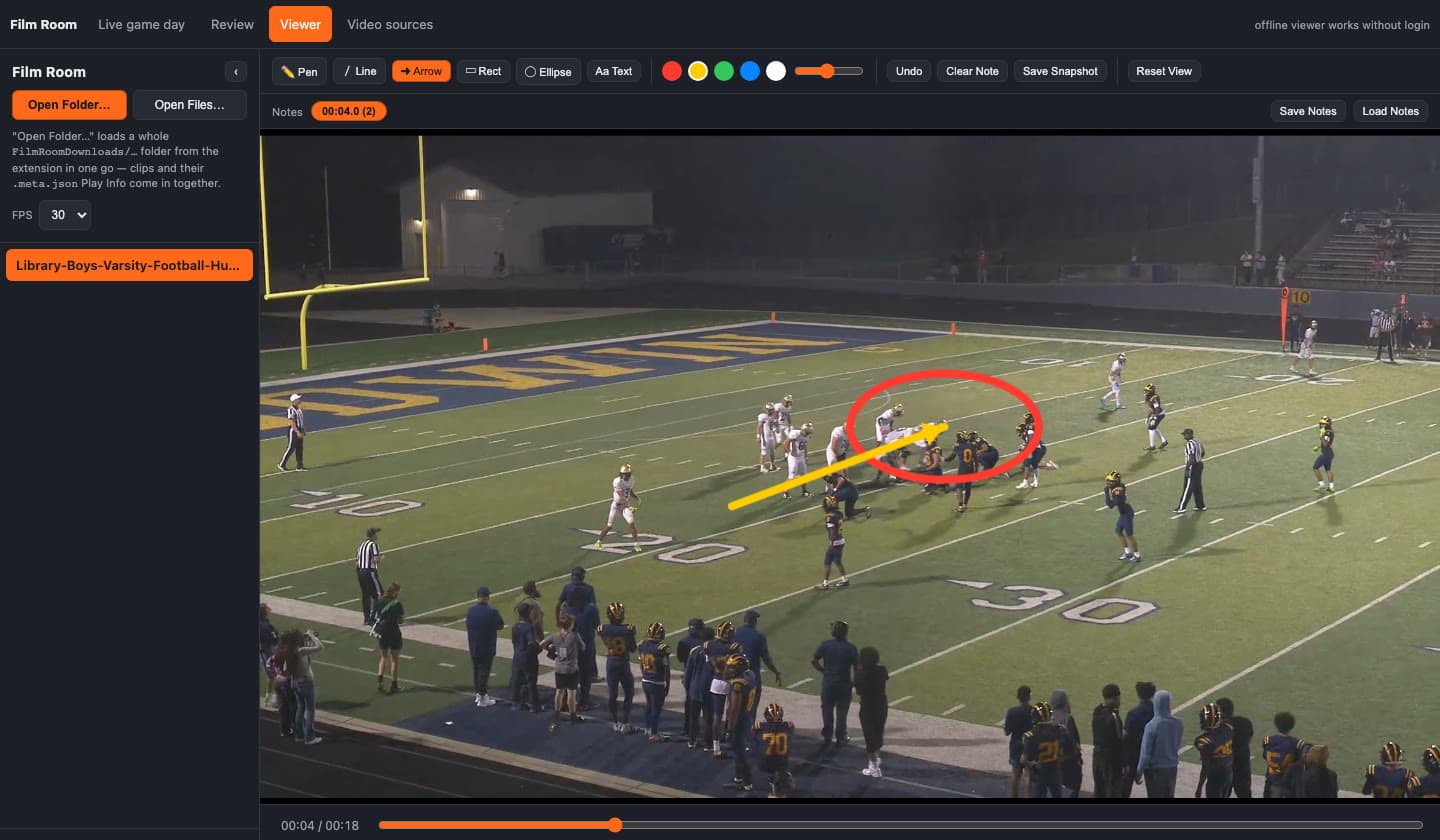
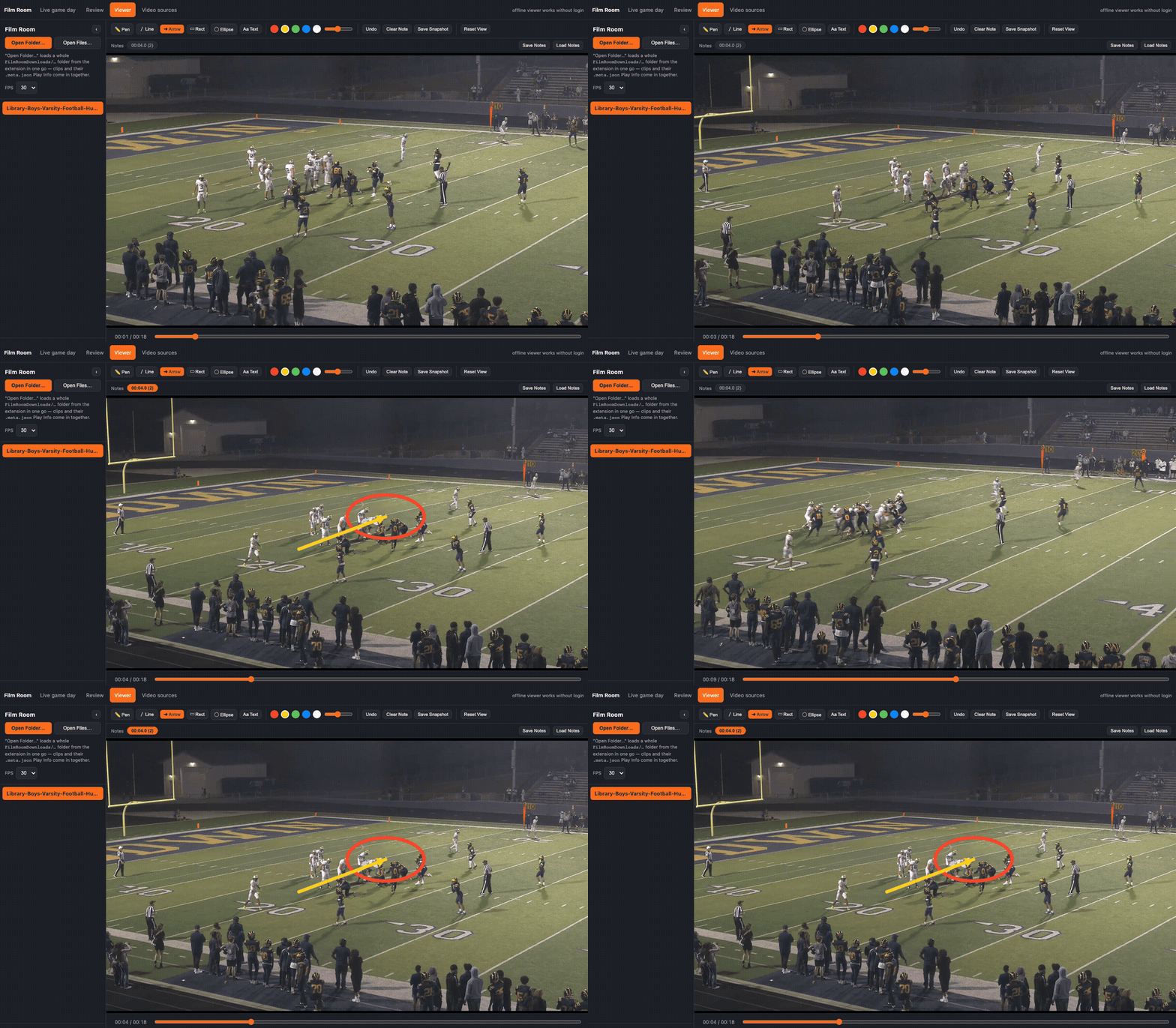
Film Room is a local coaching-film player. Load a clip, slow it down, step a frame, and draw on the picture. The drawing is tied to the timestamp you paused on. Scrub away and it leaves. Scrub back and it is there, with the notes and the play data that were saved beside the file.
The same repo ships a Manifest V3 extension, Film Room Downloader, scoped to *.hudl.com. It watches the logged-in tab for the video the page is already fetching and saves that file through Chrome's download manager. Open Film Room Review… opens the player from inside the extension package. No separate server. The published build is Film Room Downloader on the Chrome Web Store.
Source: github.com/mitchelldawkinsjr/hudl-download. The field story is in Review When the Connection Drops.
Status: Active. Web player, installable PWA, Electron app, and the extension on the Chrome Web Store.
Problem & Solution
The Problem
- The review happens where the network is bad. Bus, sideline, locker room. A stream that needs a steady connection stops the meeting, and streaming the same cutup again spends the data plan.
- The coaching marks have to travel with the clip. Telestration, written notes, and a save the next person can open. A downloaded MP4 with none of that is just a file.
- Hudl's export is a request, then an email. Longer playlists take longer to come back. The meeting does not wait on that queue.
- A playlist is not one URL. Hudl prefetches, and one play can have two camera angles. Naming every file after whatever the toolbar happens to show mis-numbers the batch.
The Solution
- Play local files in a plain
<video>with a canvas on top. Speed, frame step, and the seek bar never round-trip to a server. - Stamp each drawing on a timestamp and persist it in
localStorage, a JSON export, or a sidecar next to the video. - Download through the browser session the coach is already logged into. The extension does not read or store the password.
- Write a
.meta.jsonsidecar from Hudl's own per-clip fields, and correlate each video request with the play that was on screen when the request fired. - Open the player from the extension and load the whole
FilmRoomDownloads/…folder in one pick.
Architecture
| Layer | Role |
|---|---|
Player (shared/player.js) | Playback, frame step, and timestamped telestration. Shared by the web app and Electron |
Web app (web/) | File and folder pickers, notes in localStorage, Play Info from .meta.json |
Service worker (sw.js) | Caches the app shell so an installed PWA opens with no network. Video files stay local and are not cached |
Electron (electron/) | Same player. Notes auto-save to <video-name>.telestration.json beside the file |
Extension (extension/) | webRequest classification, chrome.downloads, play-number observer, Download All |
Remux (downloader/remux.js) | ffmpeg -c copy for HLS or DASH segment folders. A progressive MP4 skips this |
Download path
Hudl tab
  content.js  --play snapshot-->  background.js
  webRequest.onBeforeRequest  --classify URL-->  streamsByTab
                                                    │
popup / Download All  --executeScript (play fields)-->  page DOM
                       --downloads.download---------->  Chrome download manager
                                                    │
                         FilmRoomDownloads/<date>_<time>/<name>/
                           clip.mp4 + clip.meta.json
Chrome sends the bytes with the cookies already on the profile. The extension classifies the URL and chooses a filename. It does not proxy the video.
Playback and telestration
Speed is video.playbackRate (0.1×–2×). Frame step pauses and nudges currentTime by 1/fps.
A note is { timeMs, strokes }. Stroke points are normalized to 0..1 against the canvas, so a resize does not slide the arrow off the player it was marking. serializeNotes() writes { version, fps, notes }.
_toleranceMs() is max(120, 1.5 frames). _visibleNote() picks the note whose timeMs is closest inside that window. Everything else is cleared off the canvas. Undo and Clear Note touch only the visible note.
The first pointer-down calls video.pause() before the stroke starts, so the timestamp cannot drift while the pen is down. A second pointer becomes pinch zoom and does not commit a one-point stroke.
Tools: pen, line, arrow, rectangle, ellipse, text. Text is an inline box, outlined so it stays readable on any frame. Save Snapshot flattens the current frame and the drawing to a PNG.
Where notes live
| Surface | Key | What reloads them |
|---|---|---|
| Web app | filmroom.notes. + name|size|lastModified in localStorage | Reopening the same file |
| Web app export | A .json file from Save Notes / Load Notes | Another browser or machine |
| Electron | <video basename>.telestration.json next to the video | Opening that video again |
The file identity is name, size, and last-modified time. A different cut of the same filename does not inherit the previous drawing.
Downloader
classifyMediaUrl labels a request as hls (.m3u8), dash (.mpd), or progressive (.mp4, .m4v, .mov, .webm, or any request Chrome tags as a media-element fetch). Hudl's own film pages serve progressive MP4, so the common path is one already-playable file. Segmented streams land as a folder and downloader/remux.js joins them with ffmpeg -c copy.
Host permission is *://*.hudl.com/*. The badge on the Hudl tab is a dot, not a count. Prefetch and a second angle make a raw URL count lie about how many plays are in the cutup. The popup's Download All (N) label is the live list.
Download All runs in the service worker so it survives the popup closing. makeSemaphore(2) caps in-flight jobs. The walk still queues the next clip as soon as it is matched, so transfer overlaps the rest of the walk. Two is a bound, chosen so a batch does not become a burst against the same origin. It is not a number tuned against Hudl's rate limits.
Files land in Downloads/FilmRoomDownloads/<mm-dd-yyyy_HH-mm>/<name>/. The clock uses - because Chrome on macOS rejects : in a download path. One Download All click shares one timestamp folder.
Open Film Room Review… calls chrome.tabs.create with chrome.runtime.getURL('web/index.html'). extension/web and extension/shared are symlinks to the repo copies, because an unpacked extension can only load files inside its own directory. Open Folder… in the player reads that download folder, clips and sidecars together.
Clip identity
Hudl renders the current play in a toolbar whose fields carry data-qa-id="clip-preview-<FIELD>-field" (PLAY #, DN, DIST, OFF FORM, OFF PLAY, RESULT, QTR, and the rest). Those populated fields become fields on <clip>.meta.json. The player's Play Info panel reads that sidecar. Select it with the video, or drop the folder and the match is by basename.
Download All cannot ask the toolbar once and stamp that play number on every file. The toolbar describes only the clip loaded in the player.
extension/content.jswatches those fields with aMutationObserverand reportsPLAY #to the service worker as it changes. Each video request is tagged with the report whose time is closest to the request. Two angles of the same play share a number, because the toolbar did not change between the two fetches.- A snapshot is trusted only when its timestamp is unique in the batch. Hudl often prefetches a run of clips under one later snapshot, after a single earlier request that had its own time. A batch-wide "any timestamp differs" check would treat that one outlier as proof and then mis-label the rest. Per-timestamp counts send the shared snapshots to the fallback.
- Fallback is the play-by-play grid, paired by position. That pairing assumes detection order matches row order, and a second angle consumes two stream slots for one row. It is only used when no unique real-time snapshot exists. A clip with neither source gets an index suffix.
The video id from the page URL's v parameter is appended either way, so two files do not collide.
shared/hudl-import.js can parse a Chrome "Save Page As → Webpage, Complete" export into angles and embedded drawings. It is verified against real exports and is not wired into the player UI yet.
Use
This is for personal offline review of film the account can already open. The extension automates the fetch the logged-in tab is already making. It does not collect credentials, and it is not a redistribution tool. Downloading may still conflict with a platform's terms even when you have viewing rights. Check those terms before you point it at a site.
Run it
Web player:
git clone https://github.com/mitchelldawkinsjr/hudl-download.git
cd hudl-download
python3 -m http.server 8934
Open http://localhost:8934/web/index.html. Open Video Files… or Open Folder…. Install from the browser once it is on http:// if you want the shell available with no network. Bump CACHE_NAME in sw.js after editing web/ or shared/.
Extension, from the Chrome Web Store: Film Room Downloader.
Extension, from this repo, on a Chromium browser:
chrome://extensions→ Developer mode → Load unpacked →extension/- On Windows, if the symlinks came through as placeholder files, run
./extension/package.shand load the unzipped package, or enable Developer Mode andgit config core.symlinks truebefore re-checking outextension/webandextension/shared - Open a Hudl film tab you are authorized to view, start playback, then use the toolbar icon
Electron:
cd electron
npm install
npm start