Film Room: Review When the Connection Drops
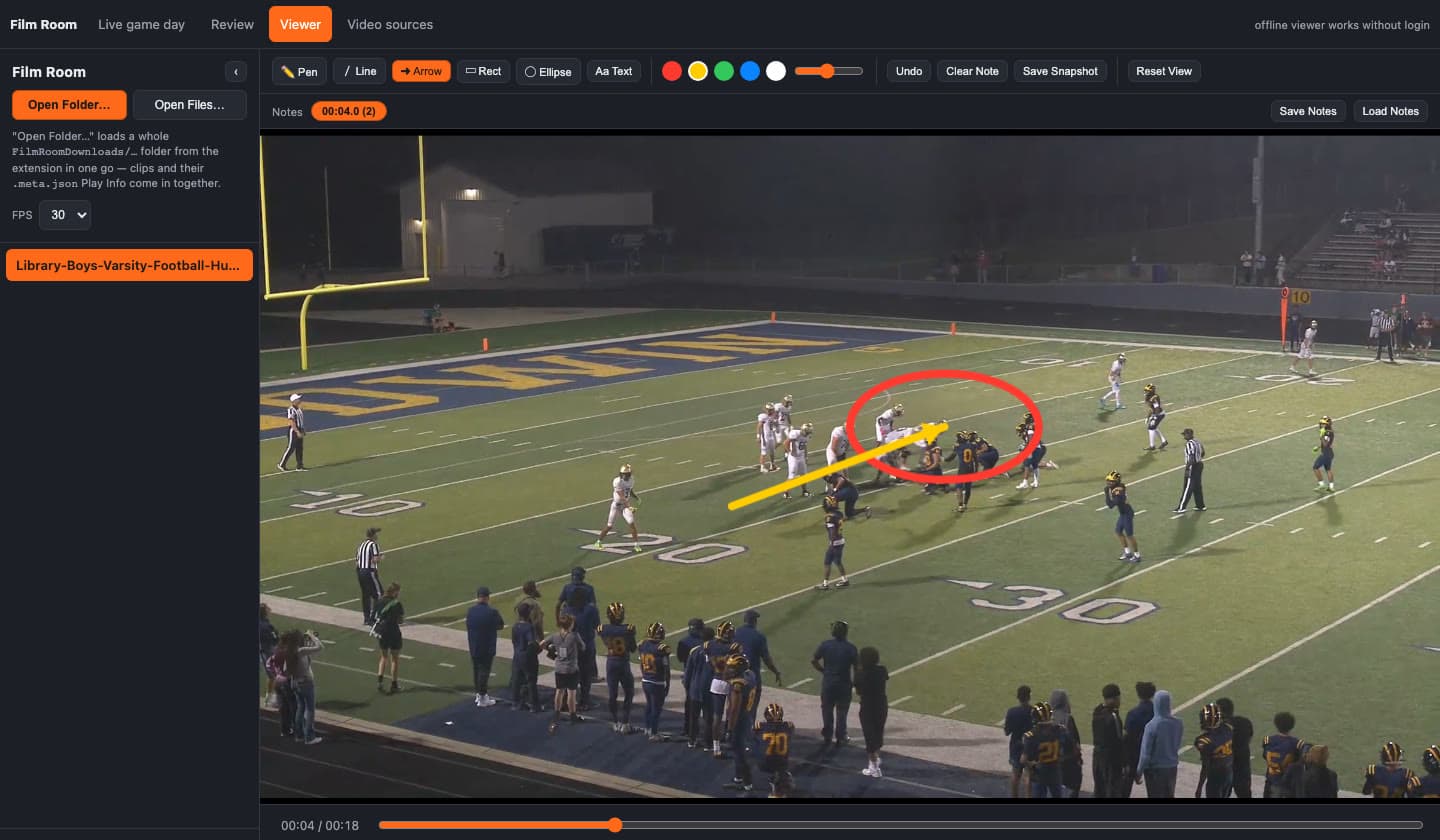
A reliable connection was the bottleneck. I wanted to put film in front of players on the bus, on the sideline, and in a locker-room meeting where the wifi comes and goes. Streaming that cutup again also meant burning through a data plan for a conversation that should have been about the play.
The second bottleneck was Hudl's own export. You request the videos, then you wait for an email. A longer playlist takes longer to finish and longer to arrive. I needed the file while I was still on the page, and I needed the film room — drawings, notes, save — sitting in the same browser.
So I built Film Room. The extension saves the video the logged-in tab is already playing. The player opens from that extension and runs on the file. Install: Film Room Downloader. Source: github.com/mitchelldawkinsjr/hudl-download. Architecture notes: Offline Film Room + Hudl Downloader.
This is a different system from the GH Film Hub, which grades film and publishes a report. Film Room is the room where you stop the clip and draw on it.
The product in one sentence
Download the cutup in the browser you are already logged into, then review it offline with the drawing and the notes still attached to the frame you marked.
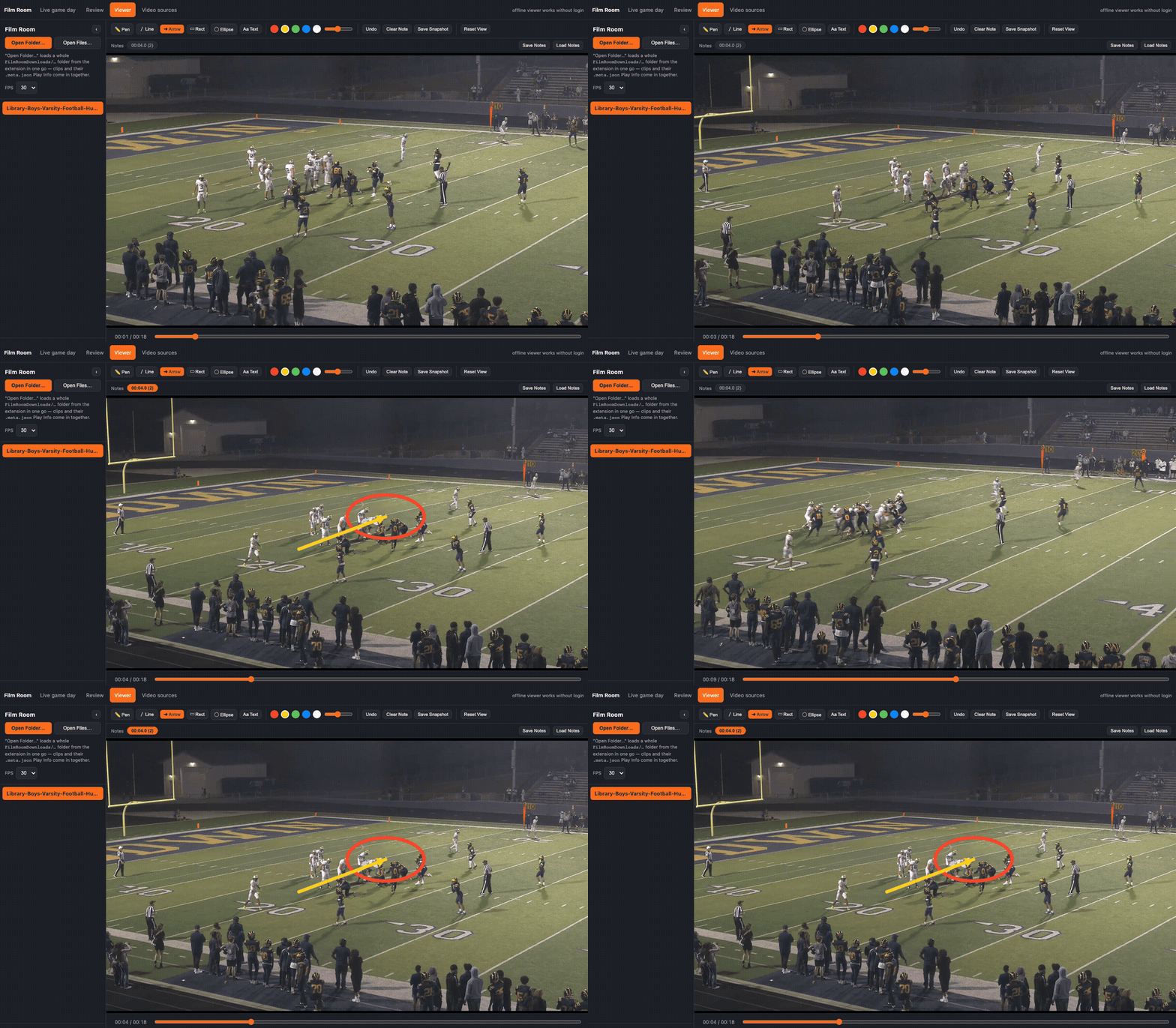
The mark belongs to that timestamp. Skip ahead and it is gone. Jump back to the note and the same circle and arrow are on the frame.
Where the film actually gets watched
The useful version of this tool is not a desk with ethernet. It is a laptop on a bus, a tablet on a sideline, or a meeting in a locker room where the access point is shared with a hundred phones.
What still has to work in that room:
- Play, pause, slow motion, and one frame at a time, from a file on the machine
- A telestration that belongs to the moment you drew it
- Notes you can jump back to, and a save that is still there the next time that file opens
- The down, distance, formation, and play call that were on screen when the clip was saved
A bare MP4 solves the data-plan problem and drops the coaching problem on the floor. The marks are the product. The video is what they point at.
Once the page is installed, the service worker caches the app shell. The video files are never put in that cache. They were already local. Installed, the player opens with no network at all.
What the export queue costs you
Hudl will package a playlist and mail a link. That path is fine when you can wait. It is a poor fit for "we are about to get on the bus" or "I need this angle before we walk out." The wait grows with the list. I stopped treating that queue as the way film gets onto a laptop.
The extension takes the other path. You are already authenticated in the tab. Playback has already caused the browser to request the media. Film Room Downloader observes that request, names the file from the play on screen, and hands the URL to chrome.downloads. Chrome performs the transfer with the session it already has. The extension does not read the password, does not store it, and does not send the video through a server I run.
Hudl's film pages serve a progressive .mp4. That file is playable as soon as it lands. HLS or DASH, when a page actually uses them, saves segments and downloader/remux.js joins them with ffmpeg -c copy. No re-encode.
Download All walks the cutup and keeps two transfers in flight. One at a time is slow on a long list. An unbounded fan-out fights the same connection you are trying to keep, and it looks like a burst to the origin. Two is a cap I chose, not a number I tuned against Hudl's limits. The walk lives in the service worker, so closing the popup does not abandon the batch. One click shares one folder: Downloads/FilmRoomDownloads/<mm-dd-yyyy_HH-mm>/<name>/. The clock uses hyphens. Chrome on macOS rejects a colon in a download path.
The drawing is a timestamp
Coaches draw on a freeze frame. The arrow means "this player, this instant." If the mark stays on screen for the rest of the play, it is decoration.
Each note stores timeMs and a list of strokes. Points are 0..1 relative to the canvas, so the same JSON lines up after a resize or on another machine. On every time update the canvas is cleared and only the nearest note inside a short window is redrawn. That window is at least 120ms, and at least a frame and a half at the current fps, so a hand scrub can still land on the note.
The pen pauses the video on pointer-down, before the first point. Otherwise the playhead moves under the stroke and the note is saved against a frame you were not looking at. Undo and clear apply to the note you can see. The others stay.
In the web app the key is filmroom.notes. plus the file's name, size, and last-modified time. Reopening that file restores the drawing. Save Notes writes a JSON file when the drawing has to move to another machine. Electron writes <video-name>.telestration.json beside the video and loads it the next time that path opens. Save Snapshot flattens the frame and the ink to a PNG for a group text when you do not need the whole clip.
Two angles are still one play
This is the bug that makes a batch unusable if you get it wrong.
The toolbar above a Hudl player describes the one clip loaded right now. Its fields are marked with Hudl's own data-qa-id="clip-preview-…-field" hooks: play number, down, distance, formation, play call, result, quarter. A single Download can read that toolbar and be done.
Download All cannot. If every file inherited the play that happened to be on screen when you clicked, the whole folder would be named for one play. Pairing "first detected URL" with "first row in the grid" fails as soon as a play has two camera angles. Wide and end zone are two requests and one row. Everything after that is off by one, and the error cascades.
extension/content.js stays on the page and watches those fields with a MutationObserver. When PLAY # changes, it tells the service worker. Each video request is tagged with the report from the moment the request fired. Two requests back to back, with no toolbar change between them, keep the same play number. That is the wide angle and the end zone of one play.
A second check stops prefetch from laundering a bad tag. Hudl often issues one early request, then a burst that all share a later snapshot. If I only asked "did any timestamp in this batch differ?" that single early request would bless every later file. A snapshot is treated as real correlation only when its timestamp appears once. Shared timestamps fall through to the grid, paired by position, and that path is labeled as a fallback because the assumption is weaker. A clip with neither source gets an index, never a guessed play number.
The page URL's v id is appended on every name, so two files still cannot collide. The same read fills <clip>.meta.json. Open Folder… on the download directory attaches that sidecar to the matching video, and the Play Info panel shows the fields that were on the toolbar.
The film room ships inside the extension
An unpacked extension may only load files from its own folder. extension/web and extension/shared are symlinks to the player. Open Film Room Review… opens chrome.runtime.getURL('web/index.html') in a new tab. From there you pick the folder the batch just wrote. There is no second app to install and no dev server to leave running on the bus.
The player is the same one the Electron app uses: HTML5 video, a canvas, no upload. shared/hudl-import.js can already parse a "Save Page As, Webpage Complete" export, including embedded drawings. That parser is not hooked up to a button yet. I am not going to describe it as a feature of the room.
What this is for
Personal offline review of film the account can already watch. The extension automates a fetch the logged-in tab is already making. It is scoped to *.hudl.com. It is not a tool for pulling film you do not have rights to, and it is not a way to republish a cutup. A platform's terms can still forbid downloading even when viewing is allowed. Read them. The code in the repo is MIT. The video you point it at is not.
Business applications
This is the shape of a forward-deployed build. The system of record stays the product the staff already pays for and already knows. The failure is the moment of use: a moving bus, a sideline, a room with bad wifi, and a vendor export that finishes on the vendor's clock.
What another team can take from it:
- Keep the session the person already has. Do not collect a second password, and do not stand up a proxy for bytes the browser can fetch itself.
- Put the artifact on the file. A drawing, a note, and the play data have to open in the same place as the video, including on a machine that will not see the network again today.
- Treat identity as a correlation problem. A list of media URLs is not a list of plays when one play has two angles and the page prefetches.
- Bound the batch. A long download that knocks the meeting off the network has failed, even if every file eventually arrives.
The same instinct is in I Didn't Replace the Spreadsheet: meet the workflow where it already lives, and move the data in the shape people will still have when the fancy path is down. Tab Recorder is the other small extension in this series. That one produces a demo MP4. This one consumes a film file and refuses to lose the ink.
I have not published adoption numbers or a timed comparison against Hudl's email export. The extension is on the Chrome Web Store as Film Room Downloader. The evidence is the path: logged-in tab, local file, timestamped notes, play sidecar, player inside the extension.
Stack
| Piece | Choice |
|---|---|
| Player | HTML5 <video>, canvas overlay, shared by the web app and Electron |
| Notes | localStorage keyed by name, size, and mtime; JSON export; Electron sidecar |
| Offline shell | Web app manifest and a service worker that caches the app, not the video |
| Extension | Manifest V3, webRequest, downloads, scripting, Hudl host permission |
| Batch | Service-worker walk, semaphore of 2, .meta.json beside each clip |
| Segments | ffmpeg -c copy when the page served HLS or DASH instead of one MP4 |
No account on my side. No database. The film stays in Downloads/ and in the browser that opened it.
Human Reflections
I got tired of the film being stuck behind a connection I could not promise. On the bus I did not want to spend the data plan to show a play, and I still needed to draw on it, write the note, and have that save there the next time I opened the same clip. Sideline and locker room were the same problem with worse wifi.
Waiting on Hudl to email the videos made it worse. You request the download, and a longer list just takes longer to show up. I wanted to grab the file in the browser I was already watching it in, then open the film room that lives in the extension and actually teach off it.
That is the whole tool. The connection can drop. The drawing stays on the frame I put it on.
Install: Film Room Downloader · Source: github.com/mitchelldawkinsjr/hudl-download · Build notes: /projects/film-room.